

A retail audit is a structured, evidence-based check of how well a store executes against defined standards, covering merchandising, pricing, inventory, and operations. The fastest path to results is a short, scored visit that requires photo proof and hands the store rep a corrective task list before you leave the parking lot. Run it in five moves:
- Schedule stores by risk, not by calendar convenience
- Scope the visit to a checklist you can finish in under 30 minutes
- Capture evidence with photos, timestamps, and GPS
- Assign corrections on the spot, with an owner and due date
- Verify the fix with a follow-up photo or a targeted re-audit
- Schedule
- Scope
- Capture evidence
- Assign corrections
- Verify
TL;DR:
- Conduct high-risk and high-revenue stores monthly in-person spot checks, while standard stores only require quarterly audits, aligning effort with risk levels.
- Use short, binary checklists limited to 25 items, prioritizing safety, legal compliance, and critical merchandising standards with mandatory photo evidence.
- Require immediate assignment of corrective actions with owners and deadlines during each audit to ensure quick resolution and follow-up verification.
- Implement automated workflows that link audit failures to task routing, enforce photo and GPS verification, and track resolution times to close operational gaps efficiently.
- Focus on ownership and rapid fix execution over high audit scores by measuring mean time to resolution and ensuring each failed item results in a verified, closed task.
Table of Contents
- What Is a Retail Audit and What Should It Measure?
- What Business Results Should a Retail Audit Drive?
- Which Type of Retail Audit Should You Run?
- How Do You Conduct a Retail Audit Step by Step?
- What Should Go on a Retail Audit Checklist?
- Who Should Collect Retail Audit Data?
- How Do You Score Audits and What KPIs Matter?
- What Mistakes Undermine a Retail Audit Program?
- How Do You Turn Audit Findings Into Verified Fixes?
- How Do You Keep Audit Evidence Reliable and Repeatable?
- Key Takeaways
- Sources
- FAQ
What Is a Retail Audit and What Should It Measure?
A retail audit is an objective, evidence-based evaluation of store execution measured against a documented standard, not a general impression of "how the store looked." Every audit needs a defined scope before a rep walks in: which channels, which store formats, which SKUs or categories, and which standard you're measuring against (a planogram, a compliance policy, a pricing sheet).
Vague objectives produce data nobody can act on. Specific, measurable targets do the opposite. Set objectives like these before the first visit:
- Planogram compliance rate (degree of facings matching the approved layout)
- On-shelf availability (share of SKUs in stock and visible)
- Pricing accuracy (extent of shelf tags matching system price)
- Safety and code compliance (pass/fail on required signage, storage, and hazard checks)
Pro Tip: Write your objectives as a number with a deadline, not a description. "Improve planogram compliance" is a wish. "Hit 90% planogram compliance in the top 50 doors by end of Q2" is an audit program. Shopify's store-audit framework backs this up: a checklist-driven, evidence-captured process is what makes comparisons across locations possible in the first place.
What Business Results Should a Retail Audit Drive?
An audit program that only produces PDF reports is a cost center. One that closes the gap between what's on the shelf and what's supposed to be there is a revenue lever.
The core benefits show up in four places: a smaller execution gap between plan and reality, higher on-shelf availability, fewer pricing and promotional errors, and lower shrink from better stockroom discipline. A retail audit program done right tightens all four at once, because most execution failures share the same root cause: nobody caught the problem fast enough to fix it before the next customer walked by.
Track improvement with metrics stakeholders actually care about:
- Sales lift in categories with higher audit scores versus lower-scoring stores
- Reduction in out-of-stock incidents month over month
- Corrective task completion rate and average time to close
Tie audit scores directly to these commercial numbers when you present to leadership. A compliance percentage means little to a CFO. A compliance percentage next to a sales delta means everything.
Which Type of Retail Audit Should You Run?
Not every question needs a full store walk. Picking the wrong audit type wastes field hours gathering data nobody will use.
Compliance audits check adherence to contracts, safety codes, or brand standards, and answer the question: "Are we meeting our legal and contractual obligations?" Merchandising and planogram audits measure whether the shelf matches the approved plan, answering: "Is our product where it's supposed to be, in the right quantity?" Operational audits look at staffing, cleanliness, and process adherence behind the counter. Mystery shopper audits capture the customer-facing experience through an anonymous visit, useful when you need to know how staff actually behave when no manager is watching. Remote audits, run through photo submissions or crowdsourced field reps, trade some verification rigor for speed and lower cost per visit.
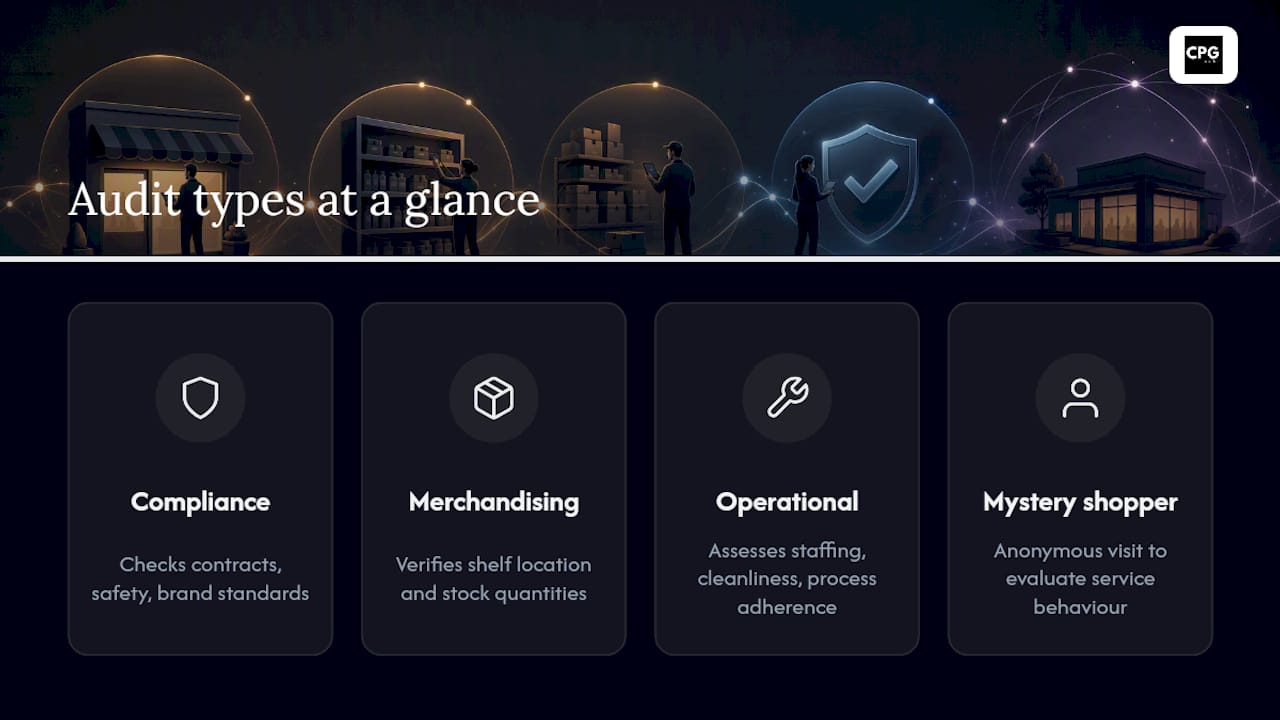
Use in-person audits for high-risk or flagship stores where nuance matters. Use remote or crowdsourced checks for high-frequency spot checks across a large footprint. Reserve mystery shopping for service-quality questions that a checklist can't capture on its own.
How Do You Conduct a Retail Audit Step by Step?
Here's the five-step method that turns a store visit into measurable action, not just a folder of photos.
Step 1: Schedule and prepare. Pull the last three audit scores for each candidate store and prioritize by risk: chronic low performers, high-revenue locations, and stores with recent complaints go first. Review category-specific issues before you arrive so you're not discovering the store's history on-site.
Step 2: Define scope and build the checklist. Keep it short and mostly binary (yes/no, pass/fail) with a few weighted items for categories that matter most to revenue. A 25-item checklist with clear scoring beats a 90-item checklist nobody finishes consistently.
Step 3: Execute the visit with evidence controls. Every flagged item needs a photo, a timestamp, and a GPS-verified location. This isn't bureaucracy. It's what makes the audit defensible when a store manager disputes a finding three weeks later.
Step 4: Assign corrective actions immediately. Before leaving the store, generate a task for every failed item, name an owner, and set a due date. A gap list that sits in an inbox until Friday is a gap list that never gets fixed.
Step 5: Verify completion. Require a follow-up photo for closure, and schedule a re-audit for high-priority items rather than trusting a self-reported "done."
Here's a compact scoring example:
Pro Tip: Weight safety and legal items at zero tolerance. A store can score 95% overall and still fail the audit if a fire exit is blocked. Don't let a high average mask a critical miss.
What Should Go on a Retail Audit Checklist?
A copy-ready checklist works best organized in priority layers, so a rep with limited time knows what to check first if the visit gets cut short.
Layer 1, safety and legal: fire exits clear, expiration dates current, hazard signage posted. Any failure here halts the audit until resolved.
Layer 2, customer-facing standards: price tags matching system pricing, promotional point-of-sale materials current and correctly placed, shelf tags legible.
Layer 3, merchandising: planogram match by facing count, product rotation and freshness, endcap and secondary display compliance.
Layer 4, operations and back stock: stockroom organization, inventory counts against system records, receiving area cleanliness.
- Require a photo for every Layer 1 and Layer 2 item, no exceptions
- Flag critical issues (safety, legal, stockouts) separately from cosmetic issues (a slightly crooked shelf strip) so corrective task priority is obvious
- Cap the full checklist at 25 to 35 items to keep completion time under 30 minutes
Pro Tip: Color-code critical versus cosmetic flags in your audit app. A red flag should trigger an automatic notification to the store manager; a yellow flag can wait for the weekly summary.
Who Should Collect Retail Audit Data?
The method you choose shapes both the cost and the trustworthiness of what you collect. Internal reps know the account history and can spot subtle problems, but they cover fewer stores per week. Third-party audit agencies scale coverage across large footprints and add independence, since the rep has no stake in a favorable score. Mystery shoppers answer service-quality questions internal staff can't self-report honestly. Crowdsourced field teams, recruited on demand through a gig marketplace, offer the lowest cost per visit but need the tightest technology controls to keep data trustworthy.
Whichever model you pick, the technology layer decides whether you can trust the results. Look for:
- GPS and geofencing that confirm the rep was physically at the assigned store
- Live-capture photo requirements that block uploads from a camera roll
- Timestamping on every submission
- Image recognition for automated planogram reads, which can return a compliance score and ranked gap list in under 90 seconds per shelf section
- Automated task workflows that route failed items to the right owner without manual handoff
Pro Tip: If you're weighing crowdsourced coverage against a smaller internal team, run both on the same 20 stores for a month and compare variance in scores. The gap tells you exactly how much verification rigor you're trading for reach. Tools like AI-powered shelf audit platforms increasingly close that gap by automating the image analysis step entirely.
How Do You Score Audits and What KPIs Matter?
Weighted scoring turns a checklist into a risk signal. Assign heavier weight to items with direct commercial or legal consequence (safety, out-of-stocks, pricing errors) and lighter weight to cosmetic issues. A store scoring below your threshold on weighted safety and compliance items should trigger an automatic "high risk" flag, regardless of its overall percentage.
Track these KPIs across your network:
- Compliance percentage by category and by store
- Corrective task completion rate (percentage closed within the assigned deadline)
- Mean time to close (average days from flag to verified fix)
- Audit accuracy index (inter-rater agreement across auditors)
- Out-of-stock rate trended monthly
| Store Risk Tier | Recommended Cadence |
|---|---|
| High revenue or chronic low scorers | Monthly in-person spot checks |
| Standard performers | Quarterly deep audits, remote checks between |
| Low risk, high compliance history | Quarterly remote self-assessment |
Cadence should follow risk, not a fixed calendar. Yoobic's guidance on tiered audit architecture recommends combining continuous automated monitoring with periodic in-person deep dives, so field hours go where the risk actually sits instead of spreading evenly across every door.
What Mistakes Undermine a Retail Audit Program?
The most common failure is an audit that generates a beautiful report and zero action. Fix it by making task creation part of the audit itself: no visit ends without an assigned corrective action for every failed item.
The second failure is a checklist built around subjective judgment calls ("does the display look appealing?") instead of binary, verifiable items. Fix it with calibration sessions where multiple auditors score the same store and reconcile disagreements before the program scales.
The third failure is trusting unverified photo uploads. A rep can submit an old photo from a folder, and without geo- and live-capture controls, you'll never know. Fieldpie's research on audit reliability points to photo evidence and live-capture requirements as the single most cost-effective fix for this exact problem.
- No action item on a failed checklist item means the finding gets lost
- Subjective scoring language invites disputes and inconsistent results across auditors
- Unverified photos let bad data into your dashboard without anyone noticing
Pro Tip: Run a monthly "audit of the auditors": pull five random submissions and check the metadata (timestamp, GPS) against the store's actual hours. It takes ten minutes and catches fabrication before it becomes a pattern.
How Do You Turn Audit Findings Into Verified Fixes?
An audit finding that doesn't become a tracked task is a wasted store visit. Design the workflow as a closed loop: detection, task generation, assignment, verification, and close or escalate.
- Detection. The audit flags a failed item, whether by human judgment or automated image recognition.
- Task generation. The system auto-creates a corrective task the moment an item fails, no manual entry required.
- Assignment. Route the task by issue type: safety issues go to the store manager immediately, merchandising issues go to the merchandising team, stockroom issues go to receiving.
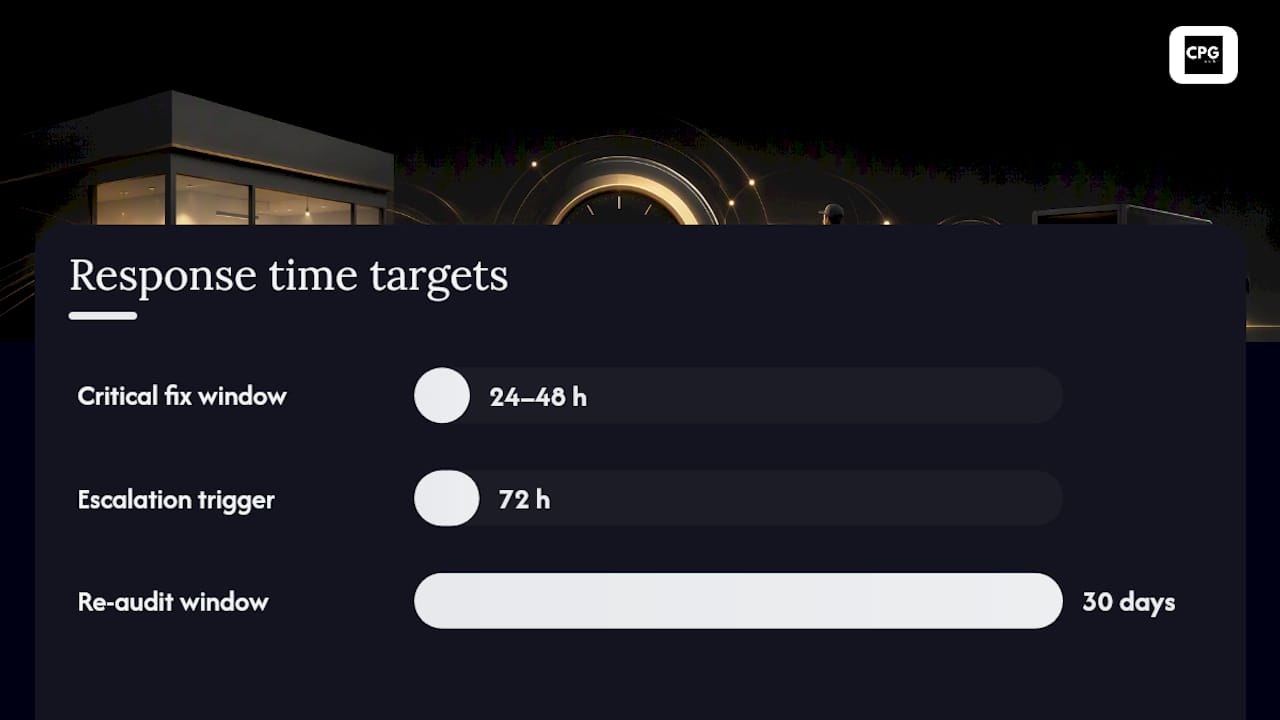
- Deadline by priority. Critical failures get a 24 to 48 hour window. Cosmetic issues can wait until the next scheduled visit.
- Verification. Require photo evidence of the fix before marking the task closed, and route it back to an auditor for confirmation rather than accepting a self-reported "done."
- Escalation. Anything unresolved past deadline automatically notifies a district manager.
VisionGroupRetail's research on execution gaps found that reps who receive a prioritized gap list during the visit itself correct many issues on the spot, cutting what used to take weeks down to minutes. That's the difference between an audit that measures a problem and one that fixes it before the auditor's car leaves the lot.
For high-priority corrections, schedule a re-audit within 30 days and track mean time to resolution as a standing KPI. If MTTR creeps upward across your network, that's an earlier warning sign of an operational bottleneck than any single store's compliance score.
Pro Tip: Set an automatic escalation rule: any critical task open past 72 hours triggers an email to the district manager, not just the store lead. Accountability up the chain closes gaps faster than accountability at the store level alone.
How Do You Keep Audit Evidence Reliable and Repeatable?
Trustworthy audit data depends on a few non-negotiable standards. Require live-capture photos (taken in-app, not uploaded from a camera roll), standardize the angle for recurring shots like planogram sections, and mark specific items as "photo required" so reps can't skip evidence on the checklist items that matter most.
Design the form itself around mostly binary questions, with conditional logic that only surfaces detail fields when a binary answer needs elaboration. A form a rep can't finish in the target window gets rushed, and rushed audits produce bad data.
- Live-capture photos with mandatory angle guidance for recurring shelf sections
- Binary-first form design with conditional detail fields
- Double-blind calibration and shadow audits to catch scoring drift between auditors
Pro Tip: Run a shadow audit quarterly, where a second auditor independently scores a store the same day as your primary auditor. Calibration checks like this are how mature programs keep inter-rater agreement high enough that scores measure the store, not the auditor's mood that day.
What High-Performing Retail Operators Do Differently
The operators who get the most out of an audit program stopped treating it as a policing exercise years ago. They stopped optimizing for a perfect score and started optimizing for a fast fix. A 78% compliance score with same-day corrective action beats a 92% score sitting in a report nobody reads until the next quarterly review.
The bottleneck I see most often isn't measurement, it's ownership. Audits stall when nobody's job depends on closing the loop. The teams that fix this hand every failed item a named owner and a deadline before the auditor's car leaves the lot, and they measure their program on mean time to resolution, not audit scores. Score chasing feels productive. Closing gaps is what actually moves sales.
Close the Loop Faster With a Connected Operations Platform
Running an audit is only half the job. The real bottleneck for most retail teams isn't collecting the data, it's connecting a failed checklist item to a closed, verified task without three days of email back and forth. Cpgagent's platform is built to remove that gap: audit capture, automated task routing, geo and photo verification, and dashboards live in one system instead of scattered across a spreadsheet, a group text, and a shared folder.
If you're evaluating tools, look for exactly the features this article covers: live-capture photo requirements, GPS confirmation, automatic task generation on failed items, and re-audit tracking for high-priority fixes. That combination is what turns audit data from a static compliance record into an operational execution engine. Book a walkthrough of the Cpgagent platform to see how your current audit workflow would map onto it.
Key Takeaways
A retail audit only creates value when every failed item becomes a scored, owned, and verified corrective task within a defined deadline.
| Point | Details |
|---|---|
| Define scope before scheduling | Lock in channels, formats, and measurable objectives like planogram compliance percentage before the first visit. |
| Score with weighted risk tiers | Give safety and legal items zero-tolerance weight so a high average can't mask a critical failure. |
| Require live-capture evidence | Use photos, timestamps, and GPS to make findings defensible and hard to fabricate. |
| Assign and verify every correction | Name an owner and due date on-site, then require photo proof or a re-audit within 30 days for closure. |
| Automate the correction loop | Platforms like Cpgagent connect audit capture to task routing and verification dashboards in one workflow. |
Sources
- Store Audit: How to Run a Retail Store Audit (Checklist + 5 Steps) — Shopify
- Retail Audit: What It Is, How to Run One That Actually Closes the Execution Gap — VisionGroupRetail
- The Complete Guide to Retail Store Visits and Audits — Yoobic
- Retail Audit Guide 2026: What Works and How to Improve — Fieldpie
FAQ
What Are the 5 Steps in a Retail Audit Process?
Schedule stores by risk, define scope and build a scored checklist, execute the visit with photo and GPS evidence, assign corrective actions with owners and deadlines, and verify completion through follow-up photos or a re-audit.
What Counts as an Audit in Retail?
A retail audit is a structured, evidence-based check of store execution against a defined standard, such as a planogram, pricing sheet, or compliance policy, scored with a checklist rather than a general walkthrough.
How Often Should You Audit a Retail Store?
Cadence should follow risk: high-revenue or historically low-scoring stores need monthly spot checks, while consistent performers can move to quarterly deep audits with lighter remote checks in between.
How Do You Make Sure Audit Photos Aren't Fabricated?
Require live-capture photos taken directly in the audit app, paired with GPS confirmation and a timestamp, so an upload from an old camera roll gets flagged automatically.
Can Audit Findings Be Automated Into Corrective Tasks?
Yes. Platforms like Cpgagent's operations tools can auto-generate a corrective task the moment a checklist item fails, route it to the right owner, and require photo verification before marking it closed.